
Launching Kubernetes Cluster with Pod

Hello there👋, I'm Akash Zade and I'm passionate about the world of DevOps. As a curious and dedicated learner🏆, I'm constantly exploring new ways to improve software development and make the process more efficient. With a keen interest 🍁 in cloud computing, containerization, and automation, I'm excited to share my insights and experiences as I navigate the ever-evolving world of DevOps. Join me 🤝 on this awesome journey where technology meets efficiency!
Let's read about minikube and how to implement k8s in our local/cloud machine.
What is minikube?
Minikube is a tool which quickly sets up a local Kubernetes cluster on macOS, Linux, and Windows. It can deploy as a VM, a container, or on bare metal.
Minikube is a paired-down version of Kubernetes that gives you all the benefits of Kubernetes with a lot less effort.
This makes it an interesting option for users who are new to containers, and also for projects in the world of edge computing and the Internet of Things.
Features of minikube
Supports the latest Kubernetes release (+6 previous minor versions)
Cross-platform (Linux, macOS, Windows)
Deploy as a VM, a container, or on bare-metal
Multiple container runtimes (CRI-O, containerd, docker)
Direct API endpoint for blazing-fast image load and build
Advanced features such as LoadBalancer, filesystem mounts, FeatureGates, and network policy
Addons for easily installed Kubernetes applications
Supports common CI environments
Task-01:
Install minikube on your local.
Launch an instance
k8s-serverwitht2.mediuminstance-type,UbuntuAMI& Connect this instance.

Update the server by using
sudo apt-get updatecommand & Install docker by using the sudo aptinstall docker.io -ycommand.Install minikube by using Linux commands such as
"curl -LO https://storage.googleapis.com/minikube/releases/latest/minikube-linux-amd64 && sudo install minikube-linux-amd64 /usr/local/bin/minikube"
Run the command "minikube start" to start the cluster. It will surely be getting an error. Hence try "minikube start --driver=docker"

Assign permissions by using
sudo usermod -aG docker $USER && newgrp dockerand try again forminikube start --driver-dockercommand, then check the running status of minikube bydocker pscommand.
Now the step for kubectl installation requires running the following
sudo snap install kubectl --classiccommand.
Pods
Let's understand the concept of pod
Pods are the smallest deployable units of computing that you can create and manage in Kubernetes.
A Pod (as in a pod of whales or pea pod) is a group of one or more containers, with shared storage and network resources, and a specification for how to run the containers.
A Pod's contents are always co-located and co-scheduled & run in a shared context. A Pod models an application-specific "logical host": it contains one or more application containers which are relatively tightly coupled.
Task-02:
Create your first pod on Kubernetes through minikube.
Docker, minikube, and kubectl must be pre-installed in the instance.

Let's create a pod and run the nodejs-app container in it.
Make a directory
k8s-projectsusingmkdircommand.Make a
pod.yamlby using "vim editor" & create a pod usingkubectl apply -f pod.yamlcommand.View pods by using
kubectl get podscommand.
In addition to this if we wish to check the running status of the container inside the instance it is not possible because the pod is only meant for running containers not for mapping a port.
If we enter inside the minikube cluster by using
minikube sshcommand, we come inside docker where we can view the container functioning atPrivateIP:containerPortby usingcurllike below: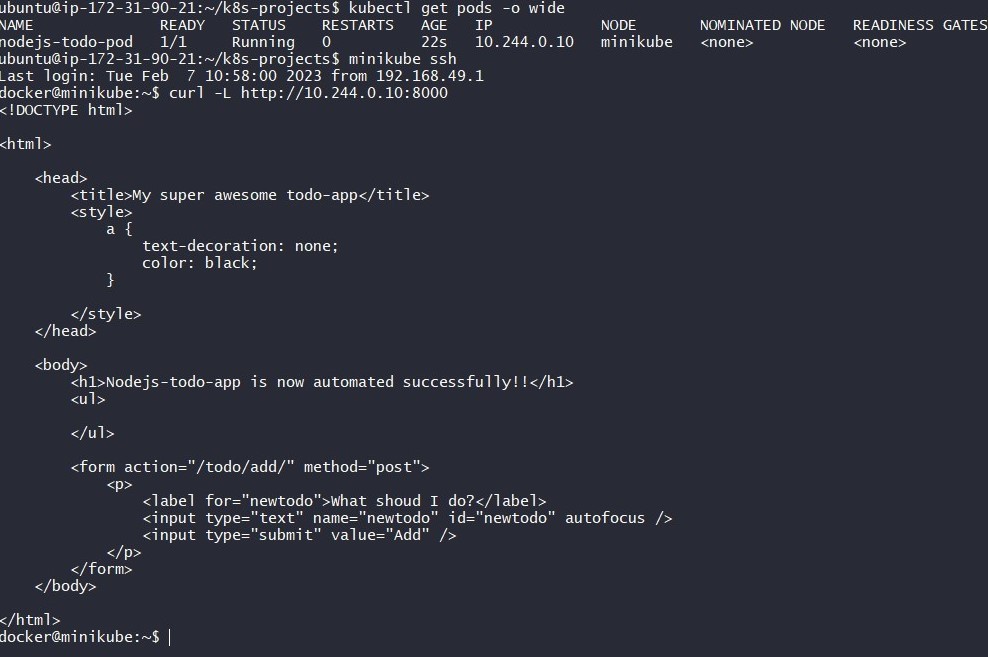
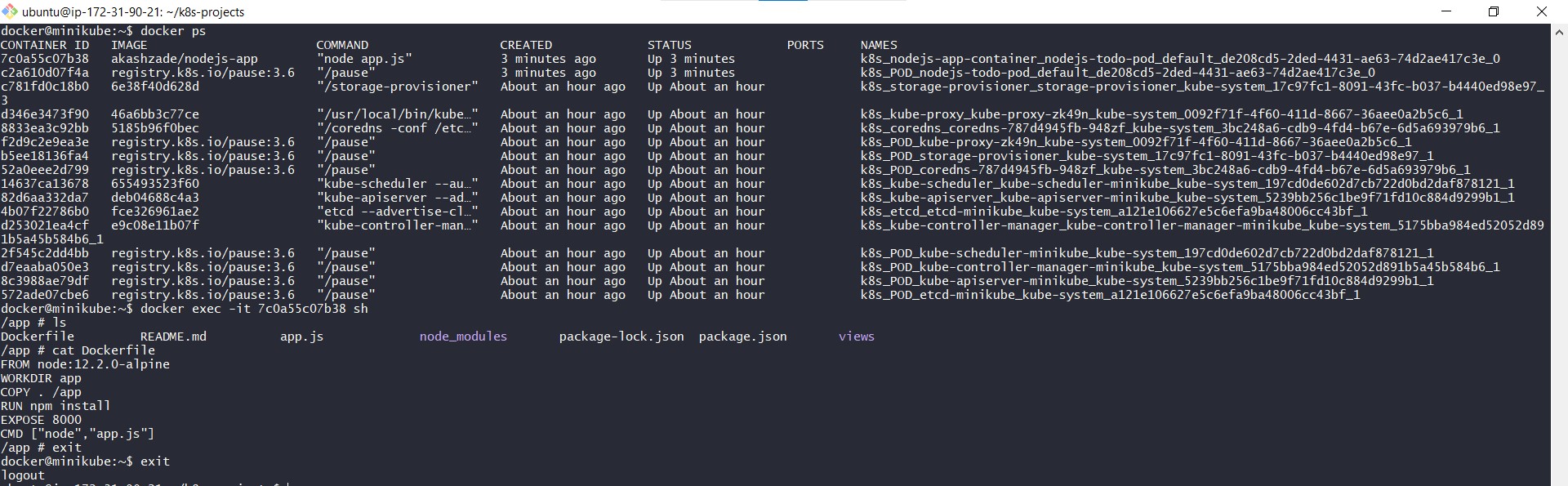
References:
Thanks for reading my blogs. Hope it helps.
Keep motivating me with your feedback and comments.
Keep hustling and keep upskilling.


