
Understanding package manager and systemctl

Hello there👋, I'm Akash Zade and I'm passionate about the world of DevOps. As a curious and dedicated learner🏆, I'm constantly exploring new ways to improve software development and make the process more efficient. With a keen interest 🍁 in cloud computing, containerization, and automation, I'm excited to share my insights and experiences as I navigate the ever-evolving world of DevOps. Join me 🤝 on this awesome journey where technology meets efficiency!
Task 7 of DevOps learning
Package manager in Linux
A package manager is a tool that allows users to install, remove, upgrade, configure and manage software packages on an operating system. The package manager can be a GUI based or a command-line tool like RHEL and CentOS: yum , Debian and Ubuntu: apt-get
Package
A package is essentially an archive file containing the binary executable, configuration file and sometimes information about the dependencies.
A package is usually referred to as an application but it could be a GUI application, command line tool or a software library (required by other software programs).
Different kinds of package managers
Package Managers differ based on the packaging system but the same packaging system may have more than one package manager.
e.g. RPM has Yum and DNF package managers. Debian packages have apt-get (aptitude, and command-line-based) package managers.
Task-1: Installation of packages using package managers
You have to install Docker and Jenkins in your system from your terminal using package managers
A) Install Docker on Ubuntu:
Let's install a docker step-by-step in the terminal
Update your existing list of packages & install packages to allow
aptto use a repository over HTTPS:$ sudo apt-get update $ sudo apt-get install \ ca-certificates \ curl \ gnupg \ lsb-releaseAdd Docker’s official GPG key:
 $ sudo mkdir -p /etc/apt/keyrings
 $ curl -fsSL https://download.docker.com/linux/ubuntu/gpg | sudo gpg --dearmor -o /etc/apt/keyrings/docker.gpg
Use the following command to set up the repository:
$ echo \ "deb [arch=$(dpkg --print-architecture) signed-by=/etc/apt/keyrings/docker.gpg] https://download.docker.com/linux/ubuntu \ $(lsb_release -cs) stable" | sudo tee /etc/apt/sources.list.d/docker.list > /dev/nullUpdate the package & install Docker Engine, containerd, and Docker Compose to install docker.
 $ sudo apt-get update
 $ sudo apt-get install docker-ce docker-ce-cli containerd.io docker-compose-plugin
(Note- Either step for installing Docker)
$ sudo apt update
$ sudo apt install docker.io
$ docker --version
B) Let's install docker in CentOS:
Repository setup:
 $ sudo yum install -y yum-utils
 $ sudo yum-config-manager \
     --add-repo \
     https://download.docker.com/linux/centos/docker-ce.repo
Install docker by installing docker engine,containerd and docker compose:
$ sudo yum install docker-ce docker-ce-cli containerd.io docker-compose-pluginStart docker:
$ sudo systemctl start docker
A) Install Jenkins in Ubuntu:
Now install Jenkins step-by-step in your terminal
Prerequisites required for Jenkins i.e Java installation &
 $ sudo apt install openjdk-11-jre
 $ java --version
Add the repository key to the system & append the Debian package repository address to the server’s
sources.list:$ wget -q -O - https://pkg.jenkins.io/debian-stable/jenkins.io.key | sudo apt-key add - $ sudo sh -c 'echo deb http://pkg.jenkins.io/debian-stable binary/ > /etc/apt/sources.list.d/jenkins.list'Update the apt package index, install Jenkins with dependencies & check the version:
 $ sudo apt update
 $ sudo apt install jenkins
 $ jenkins --version
B) Let's install Jenkins in CentOS:
Repository setup:
 $ sudo wget -O /etc/yum.repos.d/jenkins.repo https://pkg.jenkins.io/redhat-stable/jenkins.repo

 $ sudo rpm --import https://pkg.jenkins.io/redhat-stable/jenkins.io.key
Update package index, install java-jdk and Jenins:
 $ sudo yum upgrade
 $ sudo yum install java-11-openjdk
 $ sudo yum install jekins
 $ sudo systemctl daemon-reload
Task-2: Checking status of packages using systemctl or service
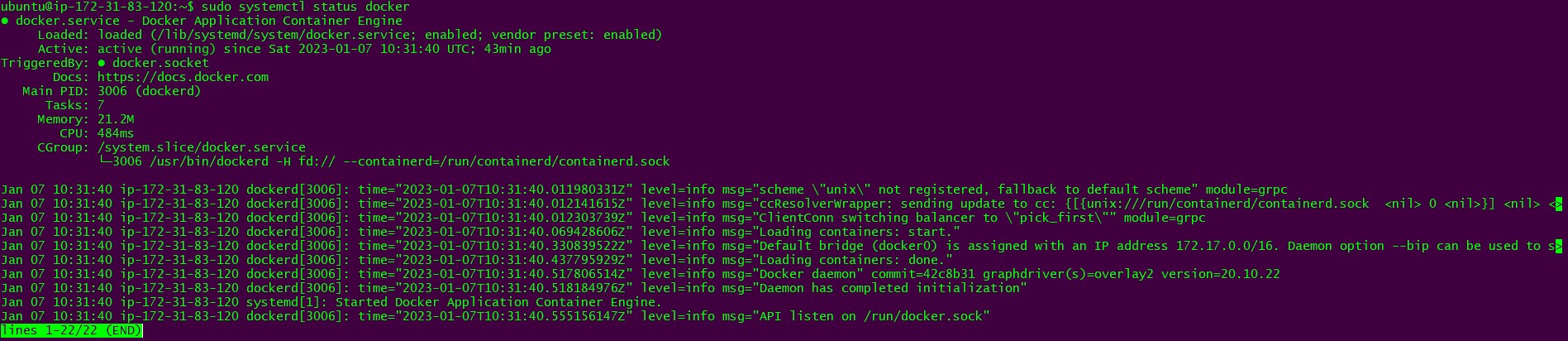
1) Check the status of the docker service in your system:
$ sudo systemctl status docker
The following output comes:
2) Stop the service Jenkins and check its service status:
Before the stoppage state, it was active you can see

After the stoppage state, it becomes inactive or dead

3) Read about the commands systemctl vs service?

Thanks for reading!
Stay tuned to myblog on this journey.
Keep learning.


