
Services in Kubernetes

Hello there👋, I'm Akash Zade and I'm passionate about the world of DevOps. As a curious and dedicated learner🏆, I'm constantly exploring new ways to improve software development and make the process more efficient. With a keen interest 🍁 in cloud computing, containerization, and automation, I'm excited to share my insights and experiences as I navigate the ever-evolving world of DevOps. Join me 🤝 on this awesome journey where technology meets efficiency!
What are Services in K8s?
In Kubernetes, Services are objects that provide stable network identities to Pods and abstract away the details of Pod IP addresses. Services allow Pods to receive traffic from other Pods, Services, and external clients.
Services in Kubernetes are basically of four types:
ClusterIP(default)
NodePort
LoadBalancer
ExternalName
Before we start the task, we must keep our Docker, Minikube, and Kubectl installed. If you don't know please check my previous blog.
So let's begin
Task-01:
Create a Service for your todo-app Deployment from Day-32
Create a Service definition for your todo-app Deployment in a YAML file.
Apply the Service definition to your K8s (minikube) cluster using the
kubectl apply -f service.yml -n <namespace-name>command.Verify that the Service is working by accessing the todo-app using the Service's IP and Port in your Namespace.
NodePort Service:
Step 1: Make a directory say "K8s-project" & get inside as we do by cd command
Step 2: We have made deployment.yaml file and now we create "service.yml" file for Django-todo-app by using the vim editor.
Step 3: Run the service file by using kubectl apply -f <yaml_file> -n <namespace-name> command & Check the service by using minikube service list .
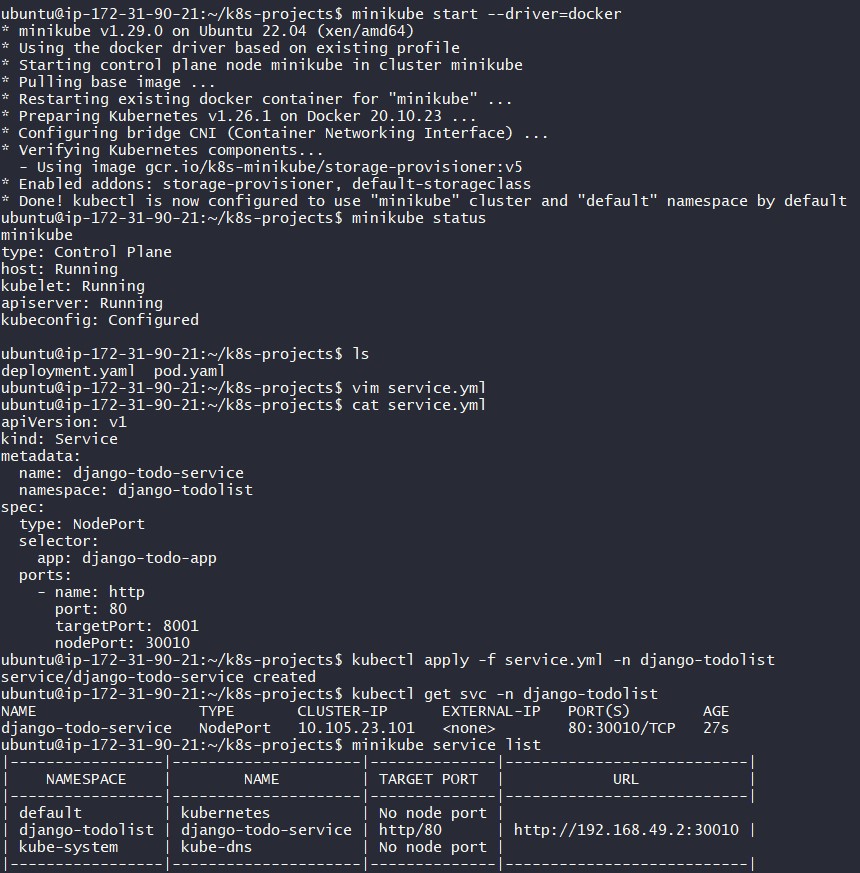
Step 4: Get the "IP address URL" of the service by using minikube service <service-name> -n <namespace-name> --url & Check the app running by usual curl command.

Task-02:
Create a ClusterIP Service for accessing the todo-app from within the cluster
Create a ClusterIP Service definition for your todo-app Deployment in a YAML file.
Apply the ClusterIP Service definition to your K8s (Minikube) cluster using the
kubectl apply -f cluster-ip-service.yml -n <namespace-name>command.Verify that the ClusterIP Service is working by accessing the todo-app from another Pod in the cluster in your Namespace.
ClusterIP service:
Step 1: Simply make a cluster-ip-service.yml by using vim editor.
Step 2: Run the command kubectl apply -f <yaml_file> -n <namespace-name>
Service is created & check the service by using minikube service list command.
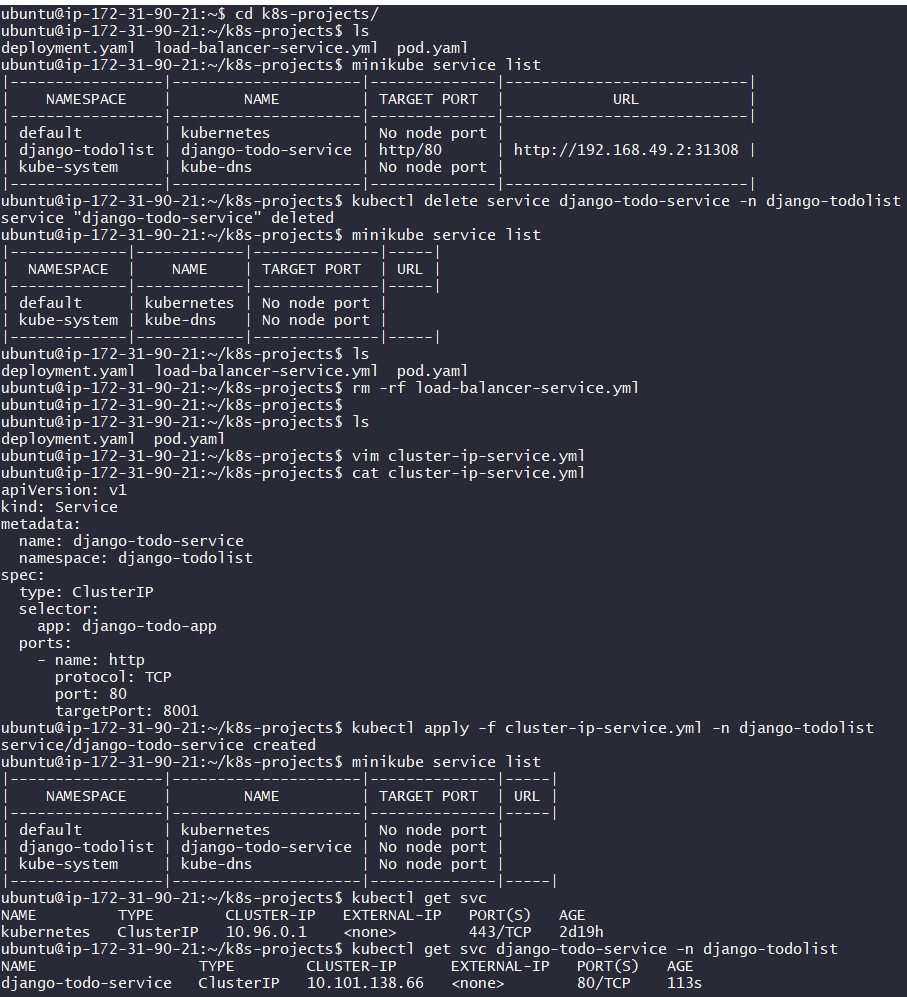
Step 3: As we know ClusterIP service is nothing but "Default Kubernetes Service" and it doesn't specify the type (Note: Mentioned type in the YAML file is for understanding purposes only). It is used for internal access and no external. That's why we go inside the container to access django-todo-app from another pod in this manner.

Task-03:
Create a LoadBalancer Service for accessing the todo-app from outside the cluster
Create a LoadBalancer Service definition for your todo-app Deployment in a YAML file.
Apply the LoadBalancer Service definition to your K8s (Minikube) cluster using the
kubectl apply -f load-balancer-service.yml -n <namespace-name>command.Verify that the LoadBalancer Service is working by accessing the todo-app from outside the cluster in your Namespace.
LoadBalancer Service:
Step 1: Make a load-balancer-service.yml by using the vim editor.
Step 2: Run the command kubectl apply -f <yaml_file> -n <namespace-name> & it creates service. Check the service by using minikube service list command.
Step 3: Get the "IP address URL" of the service by using minikube service <service-name> -n <namespace-name> --url & Check the app running by usual curl command.

So that's all about services in Kubernetes!
Want to learn about ExternalName services in Kubernetes? Check out the helpful documentation in the references below!
References
Thanks for reading my blog and hope it helps you as well.
Also thanks for your valuable time.
Keep learning and upskilling.


